스테이지 화면 전환구현, 구현 이유는 이러하다.
스테이지 전환시 현재 프로젝트에서는 로딩이 없이 플레이어를 바로 다음 스테이지로 넘겨주는 구조를 띄고 있다.
하지만 플레이어가 스폰할때 여유를 두고 맵을 생성한 뒤 카메라를 이동시키는데 연출을 위해 플레이어 객체를 setOFF 시키니 문제가 발생했다.
카메라는 유저가 다음 스테이지로 가는 포탈을 따라갈 플레이어가 없어 위치가 고정되고 그동안 찰나의 순간에 맵이 생성되는 모습이 보였다. 또 유저가 스폰될때 종합 1초정도의 여유를 가지고 스폰 되는데 이때도 카메라를 이동시키는 것이 보여 이를 해결하기 위해 중간 로딩 UI를 삽입하게 되었다.
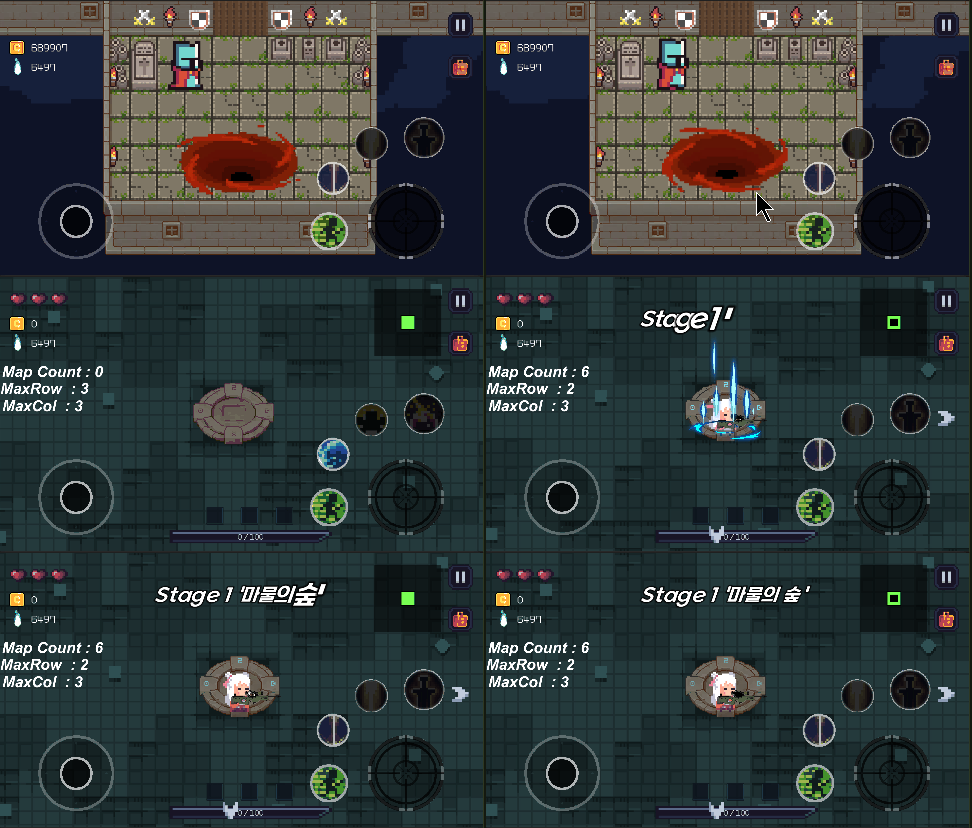
우선 각각의 플레이어 이동 애니메이션 및 UI로딩 구간을 보자

성소 생성 스크립트 부분
 private IEnumerator CoInitPlayerSpawn()
    {
        var Pos = this.spawnPoint.transform.position;
        this.mainCam = Camera.main;
        this.mainCam.transform.position = new Vector3(Pos.x, Pos.y + 1, -11);
        yield return new WaitForSeconds(0.2f);
        this.spawnPortalEffect.Play();
        yield return new WaitForSeconds(0.2f);
        this.player = GameObject.Instantiate(this.player);
        this.player.transform.position = new Vector3(Pos.x, Pos.y + 1, Pos.z);
        this.mainCam.GetComponent<MainCameraController>().Init();
}코루틴을 이용하여 플레이어 생성및 애니메이션 (파티클 시스템) 생성을 제어 및 관리하였다.
(파티클 시스템 관련 자세한 사항은 이전 포스팅 참조)

유저의 던전이동 스크립트 부분
private IEnumerator CoStartDungeonPortalAnim()
    {

        this.dungeonPortalEffect.Play();
        yield return new WaitForSeconds(0.2f);
        this.player.SetActive(false);
        yield return new WaitForSeconds(1f);
        this.onintotheDungeon();
    }
유저의 던전 생성 부분 스크립트
 /// <summary>
    /// 플레이어 스폰 제어
    /// </summary>
    /// <param name="startRoomTrans"></param>
    /// <returns></returns>
    private IEnumerator CoPlayerSpawnControl(Transform startRoomTrans, System.Action onComplete)
    {
        var startPos = startRoomTrans.position;
        this.mainCam.transform.position = new Vector3(startPos.x, startPos.y, -11);
        if (onComplete != null)
            onComplete();
        yield return new WaitForSeconds(0.3f);
        Debug.Log(startRoomTrans);
        var comp = startRoomTrans.GetComponentInChildren<ParticleSystem>();
        comp.Play();
        yield return new WaitForSeconds(0.2f);
        if (!this.isPlayerSpawned)
        {
            this.player = Instantiate(this.player, startRoomTrans);
            this.player.gameObject.SetActive(true);
            this.isPlayerSpawned = true;
            this.SetSkillCoolTime();
            yield return null;
            this.mainCam.Init();
        }
        else if (this.isPlayerSpawned)
        {
            this.player.gameObject.SetActive(true);
            this.player.transform.SetParent(startRoomTrans);
            yield return null;
            this.mainCam.Init();
        }
        var SpawnPoint = startRoomTrans.GetChild(4).gameObject;
        SpawnPoint.GetComponent<SanctuaryPlayerSpawnPoint>().Init();
        var pos = SpawnPoint.transform.localPosition;
        this.player.transform.localPosition = new Vector3(pos.x, pos.y + 1, pos.z);
        EventDispatcher.Instance.Dispatch(EventDispatcher.EventName.UIPortalArrowControllerInitializingArrows,
               startRoomTrans);
}동일하게 코루틴을 사용하여 제어하지만 좀더 많은 스크립트 들이 관여하여 스크립트가 길어졌지만 스폰하는 골자는 성소와 동일
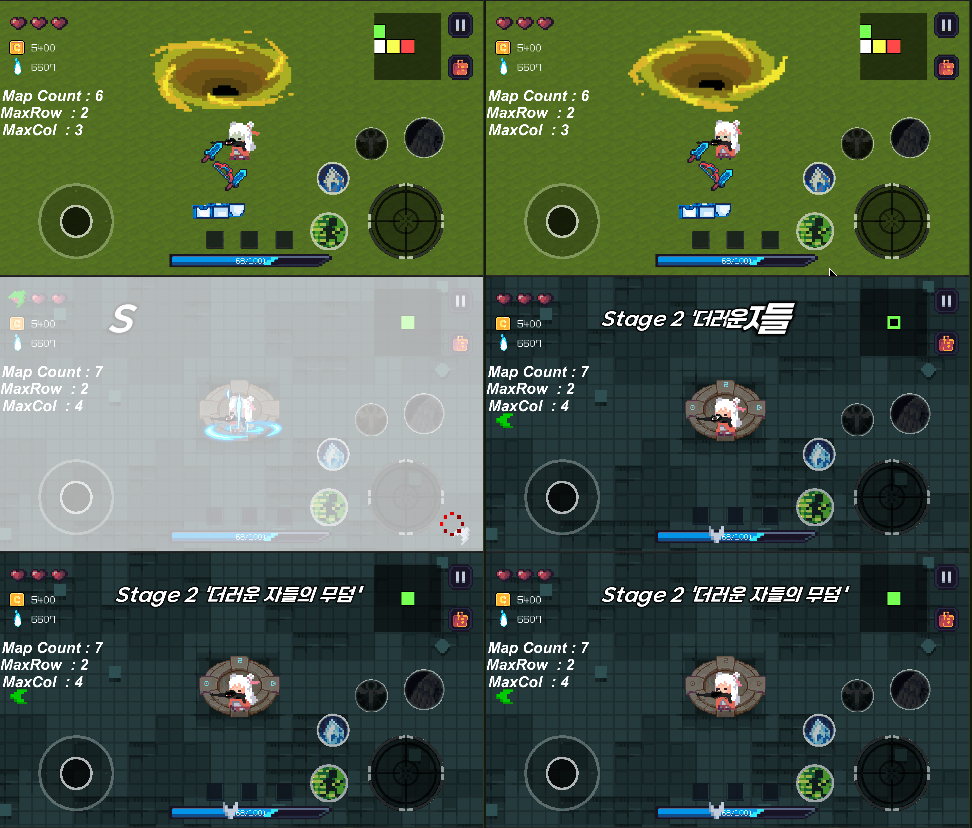
이부분이 오늘 작업한 부분인데 위의 스크립트와 동일한 코루틴을 사용한다.
하지만 매개변수로 받은 액션이 있다면 해당 액션을 발동시키는데 이는 아래 로딩UI에 들어가는 스크립트를 보면 이해가 가능하다.
using DG.Tweening;
using System.Collections;
using System.Collections.Generic;
using UnityEngine;
using UnityEngine.UI;

public class UIDungeonLoadingDirector : MonoBehaviour
{
    [SerializeField] private Image imgDim;

    public void Init()
    {
        this.imgDim.color = new Color(1f, 1f, 1f, 0f);
        EventDispatcher.Instance.AddListener(EventDispatcher.EventName.UIDungeonLoadingDirectorStageLoading,
            this.StageLoading);

        EventDispatcher.Instance.AddListener(EventDispatcher.EventName.UIDungeonLoadingDirectorSanctuarytLoading,
            this.SanctuaryLoading);

        this.gameObject.SetActive(false);
    }


    private void StageLoading()
    {
        this.gameObject.SetActive(true);

        this.imgDim.DOFade(1f, 0.1f).SetEase(Ease.Linear).OnComplete(() =>
        {
            EventDispatcher.Instance.Dispatch<System.Action>(EventDispatcher.EventName.DungeonMainToNextStage, () =>
            {
                DOTween.Sequence()
                .AppendInterval(0.5f)
                .OnComplete(() =>
                {
                    this.imgDim.DOFade(0f, 0.1f).SetEase(Ease.Linear).OnComplete(() =>
                    {
                        this.gameObject.SetActive(false);
                    });
                });

            });

        });
    }

    private void SanctuaryLoading()
    {
        this.gameObject.SetActive(true);
        this.imgDim.transform.GetChild(0).gameObject.SetActive(false);
        this.imgDim.DOFade(1f, 1f).SetEase(Ease.Linear).OnComplete(() =>
        {
            EventDispatcher.Instance.Dispatch(EventDispatcher.EventName.DungeonMainPlayerToSanctuary);
        });
    }
}분석해보면 이닛시 등록한 메서드를 객체가 디스패치 할시 닷트윈을 이용하여 UI를 페이드 인, 이후 완료되었을시에 위의 코루틴을 시작, 매개변수로 정의한 닷트윈 메서드 (페이드 아웃 및 셋 오프 ) 를 실행한다.
이는 던전의 로딩이 끝났을시 콜백을 받아 처리하는 부분이며 DOTween.Sequence().AppendInterval(0.5f) 메서드를 이용해 코루틴과 유사하게 코드를 제어한다.
Sequence().AppendInterval() 을 사용할시 일정 시간이 지나 발동할 코드를 Oncomplete 메서드에서 사용 가능하며 이는 생각보다 굉장히 유용하게 사용할수 있을듯 하다.
'프로젝트 > 건즈앤 레이첼스' 카테고리의 다른 글
| [ 유니티 프로젝트 ] 닷트윈 스테이지 텔레포트 애니메이션 개선 및 맵젠 맵 추가 (0) | 2023.05.12 |
|---|---|
| [MySQL] view 만들기 및 인덱스 (색인) (1) | 2023.05.11 |
| [유니티 프로젝트] 포탈 이펙트 및 어나운스 UI 추가 (0) | 2023.05.08 |
| [유니티 프로젝트] 스타트룸 제작 (2) | 2023.05.07 |
| [ 유니티 프로젝트] 대화창 팝업 구조 잡기 및 데이터 연동 (0) | 2023.05.06 |